
Upgrade Theme License
If you previously purchased a theme with a lower license (e.g., Personal) and want to upgrade to a higher license (e.g., Developer or more domains), you can do it directly from the Kentooz member area.
Video Tutorial
Please watch the following tutorial video for a complete guide:
1. Check Whether the Theme Supports License Upgrades
Not all themes support license upgrades.
Some themes provide only one license type, while others offer upgrade options to:
- Developer License
- Multi‑domain licenses (e.g., 5 domains, 200 domains, etc.)
To check:
- Log in to your Kentooz account.
- Open the Active Subscriptions page.
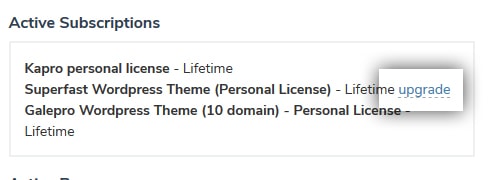
- If your theme supports upgrades, an Upgrade button will appear on that subscription.
The upgrade button may look different over time, but it is usually next to the active subscription/theme information. Example:
2. Choose the Upgrade Type
After clicking Upgrade:
- A popup with upgrade types will appear.
- Select the desired upgrade, for example:
- Upgrade to 5 domains.
- Upgrade to 200 domains.
- Upgrade to a Developer license.
- Available options depend on the theme and package.
3. Complete the Upgrade Process
After choosing the upgrade type:
- Click Upgrade Subscription.
- You will be redirected to the payment method used during the initial purchase (e.g., PayPal or bank transfer).
- Continue the payment process until completed.
After payment is confirmed:
- Your subscription will be upgraded to the new license.
- The upgrade price is usually the difference between the old and new license (details follow Kentooz’s system).
4. License Key Changes
Important notes:
- After upgrading, the old license key will automatically become invalid.
- The system will generate a new license key according to the new license.
- You need to:
- Update the license key on sites using the theme.
- Remove or replace the old license key with the new one.
If you want to buy a new license key while keeping the old license key (e.g., for a separate domain):
- Do not use the upgrade feature.
- Make a new purchase for the additional license.