
Top Navigation Settings in the Superfast Theme
Superfast provides a Top Navigation (top bar) area to display additional menus at the top of the site, such as links to important pages or social links.
Video Tutorial
Please watch the tutorial video below for a complete guide:
Enable Top Navigation
- Go to Appearance → Menus.
- Create a new menu or use an existing one.
- Add desired menu items (pages, custom links, etc.).
- In Appearance > Menus > Manage Locations, choose Secondary and Save Changes.
- Click Save Menu.
After saving, the menu will appear in the top bar.
Customize Top Navigation
New Customizer Settings for Top Navigation:
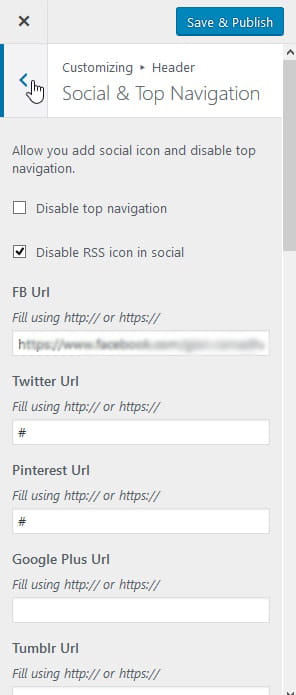
- Go to Appearance -> Customize -> Header -> Social & Top Navigation.
- Configure the top navigation as needed. Example screenshot:
Top Navigation Style Settings:
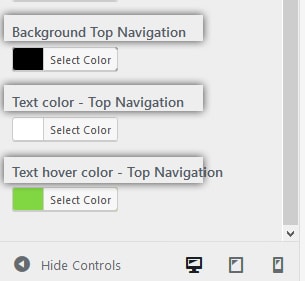
- Go to Appearance -> Customize -> Header -> Header Color.
- Configure top navigation background and text colors as needed. Example screenshot:
Adjust to match your site design so it does not distract from primary content.
Content Suited for Top Navigation
Example uses:
- Links to About, Contact, or Privacy Policy pages.
- Links to Login/Register pages.
- Social media links (can also be via header icons if provided by the theme).
Avoid adding too many items to the top bar to keep the layout clean.