
Installing and Configuring Majalahpro
Video Tutorial
Before installing Majalahpro, please watch the video above to the end.
Installation Steps
- Download the Majalahpro theme from the member area.
- Extract the package you downloaded.
- Upload the
majalahpro.zipfile via Appearance → Themes → Add New → Upload Theme. - Activate the Majalahpro theme.
- Install the recommended and required plugins, then activate all of them.
License Activation
- Go to Plugins → Majalahpro License.
- Enter the license key obtained from the Kentooz member area:
https://member.kentooz.com/softsale/license - Save and ensure the license status is active.
Import Demo Data
- Go to Appearance → Import Demo Data.
- Click the Import Demo Data button.
- Wait a few minutes until the process completes.
- After completion, your site will look similar to the official Majalahpro theme demo.
- Continue by configuring widgets and the Customizer.
Majalahpro Core Settings
The majalahpro-core plugin contains the theme’s main feature settings.
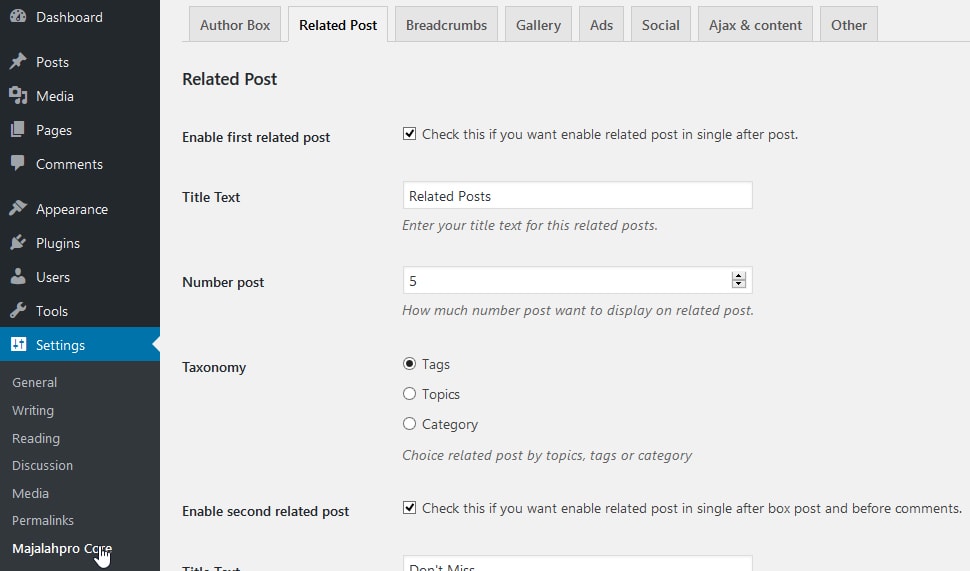
Go to Settings → Majalahpro Core. Example of settings in Majalahpro Core:
Author Box Tab
- Enable/disable the author box.
- Configure author box text and appearance (colors, styles).
Related Posts Tab
- Enable/disable related posts.
- Set the number of posts displayed in related posts.
- Up to 3 types of related posts can be configured (e.g., below content, in the sidebar, etc.).
Breadcrumbs Tab
- Enable breadcrumbs.
- Configure label text and separator.
Gallery Tab
- Enable the gallery in posts.
- Configure gallery display and related options.
Ads Tab
- Configure ad codes for all theme positions (header, sidebar, in‑content, footer, etc.).
- Enable anti‑adblock scripts if needed.
Social Tab
- Configure social share buttons.
- Configure Open Graph (if you aren’t using a separate SEO plugin).
Ajax & Content Tab
- Configure navigation with infinite scroll or disable it.
- Configure Ajax content loading behavior (e.g., homepage ajax tabs).
Other Tab
- Configure scripts in the head and footer (Google Analytics, Facebook Pixel, other scripts).
- Optimization options such as disabling emoji scripts, script versioning, and more.
Style Settings via Customizer
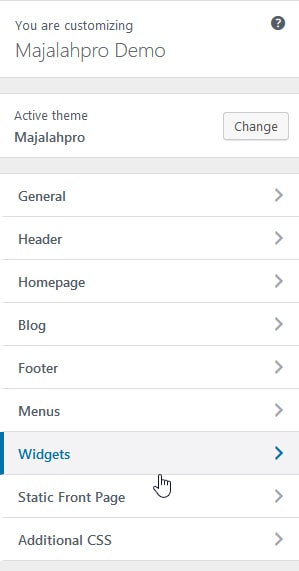
Open Appearance → Customize for appearance settings. Example Customizer settings:
General Tab
- Configure general layout (boxed / fullwidth).
- Set global colors (background, primary color, link color).
- Set the site background image.
- Configure fonts:
- Use Google Fonts.
- Set sizes and colors for headings and body text.
Header Tab
- Configure icon and logo.
- Set header background color.
- Set header background image.
- Configure header menu layout and colors.
Homepage Tab
- Configure ajax slider on the homepage.
- Configure ajax tabs (dynamic content tabs) on the homepage.
Blog Tab
- Configure blog layout:
- Sticky sidebar.
- Site navigation.
- Blog content.
Footer Tab
- Set footer background color.
- Configure copyright text.
- Set the number of widgets displayed in the footer (e.g., 3 or 4 columns).
Menus Tab
- Configure navigation menus (see the menu configuration documentation).
Widgets Tab
- Configure modules and sidebars available in the theme.
Additional CSS Tab
- Add custom CSS for advanced customization.
Server Requirements
- Apache with PHP 7.2+.
- WordPress 5+ (latest version recommended).
- Curl Module and OpenSSL enabled (required).
For security reasons, it is strongly recommended to use a PHP version newer than 7.2.