
Majalahpro v1.0.2 Update
Version 1.0.2 of Majalahpro adds several settings and improvements focused on user experience and display flexibility.
v1.0.2 Settings Video
New Features / Settings
- Display adjustments to several elements (e.g., slider, thumbnails, meta info).
- Additional settings in Majalahpro Core to control Ajax and content behavior (per the official changelog).
- Improvements or added options in the Customizer (e.g., color, font, or specific layout settings).
Note: Feature details follow the official theme changelog; this page serves as a summary of the update and a reminder that version 1.0.2 brings changes to the settings.
Below is a screenshot of v1.0.2 settings with Majalahpro Core version 1.0.3:
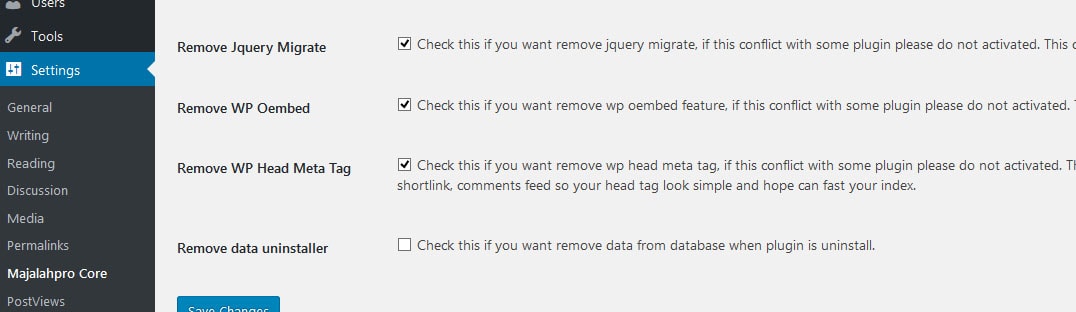
- Remove jQuery Migrate. Removes loading of jQuery Migrate from WordPress core. Removing this can increase site speed and reduce jQuery load. However, if you still use old/deprecated jQuery scripts, do not enable this feature, as your jQuery may not load properly. Learn more about jQuery Migrate: https://plugins.jquery.com/migrate/.
- Remove WP oEmbed. Removes loading of oEmbed from WordPress core. Removing this can make your site faster. Remember that WP oEmbed is important for loading certain features. Learn more: https://codex.wordpress.org/Embeds. If you use embeds and there is a conflict with certain plugins, it’s recommended not to enable this feature.
- Remove WP Head Meta Tag. Removes meta tags added by WordPress core, such as RSD, wlwmanifest, feed links, shortlink, comments feed, and other default meta tags. Note that some plugins use these features; for example, Jetpack needs XML‑RPC and others. If conflicts occur with certain plugins, do not enable this feature.
Recommendations After Update
- Backup your site before updating the theme.
- After the update:
- Open Appearance → Customize and recheck display settings.
- Open Settings → Majalahpro Core to see new options.
- If you use cache plugins:
- Clear cache (plugin, CDN, and browser) so display changes appear correctly.
Troubleshooting
If the display changes after the update:
- Check whether you use a child theme and have template overrides that need adjustment.
- Review Majalahpro’s full changelog documentation.
- If you find a bug:
- Ensure the theme and other plugins are updated to the latest versions.
- Temporarily disable non‑essential plugins to check for conflicts.
- If the issue persists, contact Idtheme support with version details and screenshots.