
Settings Migration in Muvipro Version 2.0.0
In Muvipro 2.0.0, there are important changes:
- Several settings were moved from the Idmuvi Core plugin to the theme Customizer.
- A new feature: a dedicated widget.
- Some legacy features considered less useful were removed to streamline the theme.
Recommended after updating:
- Take a site backup.
- Clear cache (cache plugins, CDN such as Cloudflare, and the browser).
Video Tutorial
If you're following this documentation alongside the official video, watch the video first, then follow the steps below.
Settings Moved to the Customizer
In this version, several settings previously located at Settings → Idmuvi Core were moved to:
Appearance → Customize → Movie → Movie Content
Settings moved:
- Social Share
- Breadcrumbs
- Related Posts
- Facebook Comments (including FB App ID)
Screenshot from the customizer:
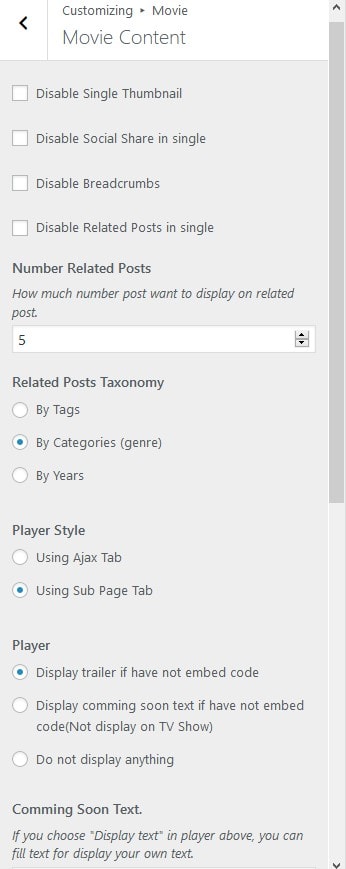
Summary of Settings in Customizer → Movie → Movie Content
In the Movie Content panel, you can:
- Disable Social Share
- Turn off the share buttons if you use another social sharing plugin.
- Disable Breadcrumbs
- Turn off built‑in breadcrumbs if you don’t want to show them.
- Disable Related Posts
- Turn off the theme’s built‑in related posts if not needed.
- Set the Number of Related Posts
- Choose how many posts appear in the related posts section.
- Configure Related Posts Taxonomy
- Choose the basis for related posts:
- By Tags
- By Category/Genre
- By Year
- Choose the basis for related posts:
- Configure Facebook Comments
- Enable/disable Facebook comments.
- Set the FB App ID for Facebook Comments integration.
With this change, nearly all movie content display settings can be controlled directly from the Customizer without going to the Idmuvi Core page.
New Feature: Tags Cloud (Muvipro) Widget
In Muvipro 2.0.0, a new Tags Cloud (Muvipro) widget was added, configurable at:
Appearance → Widgets
Widget capabilities:
- Display a list of taxonomies:
- Tags
- Category/Genre
- Other taxonomies used for movies/TV.
- Limit the number of items shown (for example only 10 or 20 tags).
Benefits:
- More controlled tag cloud display.
- Avoid overwhelming the layout with too many tags/taxonomies at once.
Features Removed in Version 2.0.0
Several features were removed because:
- Less relevant for movie/streaming sites.
- Already replaceable by other plugins (SEO, OG, etc.).
Removed features:
- Widget Aweber, GetResponse, Mailchimp
- Opt‑in/email marketing widgets are considered less relevant for most movie streaming sites.
- Built‑in OpenGraph feature
- Use OG from SEO plugins such as:
- Yoast SEO
- All in One SEO
- Rank Math
- See also the general guide: OpenGraph di Idtheme.
- Use OG from SEO plugins such as:
- Adblock feature, Author Box, Google Plus Social Icon, and YARPP Support
- The adblock script and some add‑ons were removed to lighten the theme.
- Google Plus is no longer relevant.
- YARPP (Yet Another Related Posts Plugin) is no longer recommended as it is no longer actively developed.
- If you still have the YARPP plugin installed, it should be removed.
Important Notes After Updating
After updating to Muvipro 2.0.0:
- Clear Cache
- Cache plugins (e.g., WP Super Cache, W3TC, LiteSpeed, etc.).
- CDN cache such as Cloudflare (Purge Cache).
- Browser cache (CTRL+F5).
- Test Main Views
- Movie home.
- Single movie/episode pages.
- Related posts, breadcrumbs, and social share.
- Check Customizer Settings
- Ensure all settings under Movie → Movie Content meet your needs.
If something looks “off” after updating, it is usually due to changed CSS/JS still being cached. Make sure all caches are cleared before assuming there’s a theme bug.