
Muvipro Widget Settings
Video Tutorial
Widget Areas in Muvipro
The Muvipro theme typically provides several widget areas, for example:
- Blog Sidebar: Sidebar that appears on the blog post type or blog posts.
- Sidebar: The default sidebar that appears on all pages.
- Home module: The widget area that appears on the home (index) page. Located after the menu.
- Footer 1 – Footer 4: Widgets displayed in the footer on all pages. Footer widgets appear on the Widgets page after you set the number of footer widgets; e.g., set 4 to show Footer 1 – Footer 4.
See the example image below:
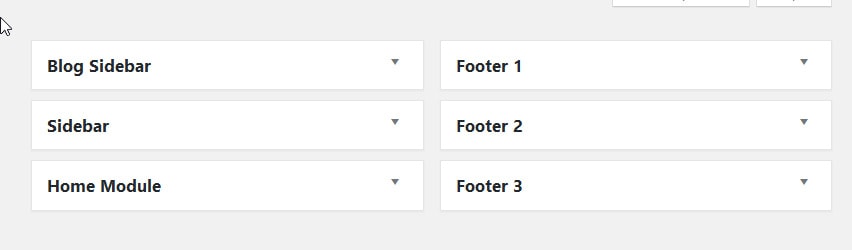
You can view the list of widget areas at: Appearance -> Widgets (or Appearance -> Customize -> Widgets).
Add Widgets
- Go to Appearance -> Widgets.
- Select a widget area on the right (Sidebar, Footer 1, Footer 2, etc.).
- From the available widgets list on the left:
- Drag & drop a widget into the target area, or
- Click a widget, choose the target area, then click Add Widget.
- Configure the widget options (title, number of items, category, etc.) and click Save.
Muvipro-Specific Widgets (Including Muvipro Core Plugin)
The Muvipro theme usually includes custom widgets. The available widgets include:
- Category Blog (Idmuvi). Displays a category list for the blog post type (recommended for the Blog Sidebar widget area).
- Module Posts (Muvipro). Displays a grid list for the Movies and TV Shows post types (recommended for the Home Module widget area). Not supported in other widget areas; only supports Home Module.
- Most View Movies (Idmuvi). Displays a list of Movies and TV Shows by most viewed (recommended for Sidebar or Footer).
- Movie Search (Idmuvi). Displays advanced search for Movies and TV Shows (recommended for Sidebar).
- Recent Blogs (Idmuvi). Displays a list for the blog post type (recommended for Blog Sidebar or Footer).
- Recent Movies (Idmuvi). Displays a list for Movies and TV Shows (recommended for Sidebar or Footer).
- Search Blog (Idmuvi). Displays a search form for the blog post type (recommended for Blog Sidebar or Footer).
Look for widget names prefixed with Muvipro or Idmuvi in the widget list.
NOTE
To change the number of Footer widget columns, go to Customizer -> Footer -> Footer Widget and adjust the column count.
Widget Placement Tips
- Use the main sidebar for:
- Search.
- Lists of latest or popular movies/episodes.
- Use footer widgets for:
- Brief site information.
- Additional link menus (FAQ, Contact).
- Social icons.