
Muvipro v1.0.7 Update
Muvipro version 1.0.7 includes refinements to existing features and possibly new options (see the official changelog).
Muvipro v1.0.7 Video Tutorial
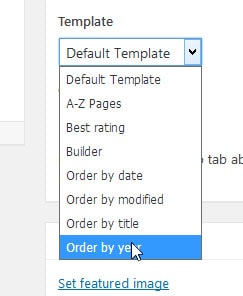
Add Custom Pages
In Muvipro 1.0.7, two custom pages are added: Order by date and Order by modified, to display movie posts by latest date or by latest modification.
Widgets
Widget configuration is changed from multiselect to autocomplete, and new orderby options are added: rand, date, and modified.
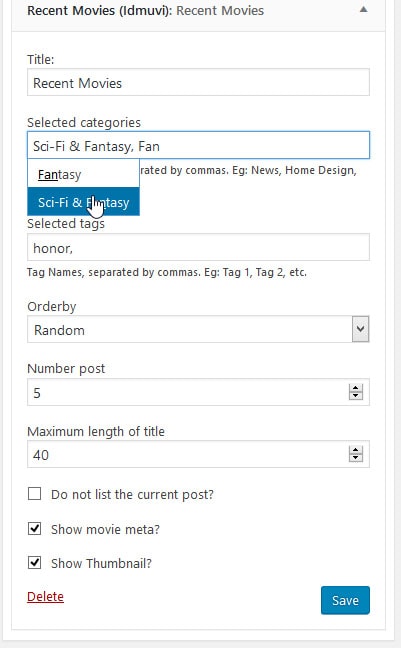
Previously, post/movie/module widgets used multi‑select. For performance reasons—when tags number in the thousands the WordPress dashboard becomes heavy—this was changed to ajax autocomplete.
A new setting is available: Orderby Random, Date, or Modified. This sorts your posts by Posting Date, Random, or Modification Date.
Focus Menu Feature
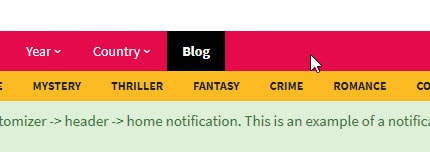
As shown above, there is a menu with a black background and bold text; this is the focus menu in the Muvipro theme.
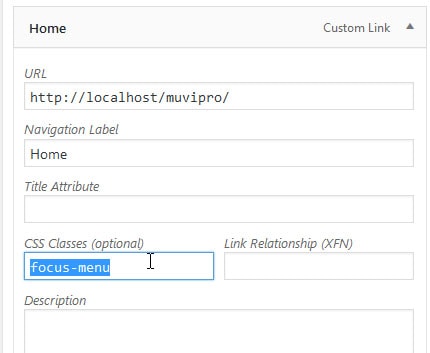
To add it, follow these steps:
- Go to Appearances -> Menus.
- Select the link you want to highlight.
- Enter the focus-menu code in the CSS Class option.
- Save.
Focus Menu Settings screenshot:
Other Features in Idmuvi Core
In addition to the features above, the Idmuvi Core plugin adds:
- Remove Jquery Migrate.
- Remove WP Oembed.
- Remove WP Head Meta Tag.
Recommendations After Updating
- Back up the site before updating.
- Update the Muvipro theme to v1.0.7.
- Clear caches (plugins and CDN).
- Test:
- Home page.
- Single movie and episode pages.
- Ajax Search and top navigation features (if used).