
Muvipro v1.0.6: Sub Page Player & Ajax Search
Version 1.0.6 of Muvipro adds settings for Sub Page Player and Ajax Search, improving the viewing and search experience.
Sub Page Player
This feature typically allows:
- When a tab is clicked, the second player appears on the sub‑page permalink.
- More flexible control over player display and episode/mirror lists.
General settings:
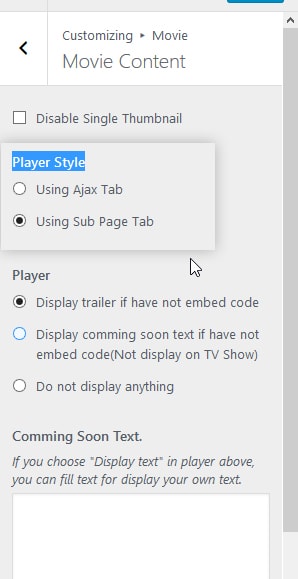
Go to Appearance -> Customizer -> Movie -> Movie Content.
Find options:
- player style.
- Configure:
- Adjust as needed: use ajax tabs or sub‑page tabs for the player.
Example settings:
Ajax Search
Ajax Search helps visitors find movies/episodes without a full page reload.
General settings:
- Go to Settings -> Idmuvi Core -> Ajax & content.
- Check Enable Ajax Search.
- Save Changes.
Behavior:
- When users type a movie title in the search box:
- Results appear as dropdown suggestions or a list without reloading the page.
Recommendations After Updating
- After updating to v1.0.6:
- Check the search page and ensure Ajax Search works.
- Check single movie views and sub‑page player (if enabled).
- If there are conflicts with other search plugins:
- Temporarily disable third‑party search plugins.
- Ensure only one ajax search system is active.
- Clear browser and server caches.